

get in touch


When people talk about developer experience, the conversation usually goes straight to AI, performance or new language support.
But many of the things that shape everyday work are smaller.
How quickly you move through the IDE without a mouse. Whether information appears where you already work. Whether you need to switch tools just to understand what happened.
Two recent JetBrains updates caught our attention because they focus exactly on that: reducing friction in daily workflows.
One improves accessibility across JetBrains IDEs. The other brings external static analysis results directly into CLion.
Different audiences, different problems – but the same idea behind both.
Accessibility improvements that make IDE workflows easier to use
Accessibility is often misunderstood as something that benefits only a small group of users.
In reality, many accessibility improvements make software easier for everyone to use.
JetBrains has been improving accessibility across multiple areas of its IDEs – from better compatibility with operating system tools to more predictable navigation and richer feedback during development.
Better support for assistive technologies
One of the practical improvements is support for cursor tracking with Windows Magnifier.
Previously, Magnifier did not reliably follow the text cursor inside the editor, which made navigation harder for low-vision users. JetBrains has now implemented cursor tracking so the experience behaves more like users expect in other applications. This builds on earlier improvements made for macOS Zoom.
Linux users are also getting expanded support. Starting with version 2026.2, JetBrains IDEs are planned to support Orca and GNOME Magnifier in supported environments.
Keyboard navigation becomes more predictable
JetBrains is also improving how users move through the IDE without relying on a mouse.
On Windows, pressing Alt now behaves more like native applications and moves focus to the main menu. This creates a more familiar experience for keyboard-only and screen-reader users.
Navigation between larger IDE areas is also evolving. Instead of forcing users to tab endlessly through interface elements:
- Tab and Shift + Tab stay within the current area
- Dedicated shortcuts help move between larger IDE sections
- Toolbar and status bar navigation becomes more accessible
This creates a more structured way to move through complex interfaces.
Audio feedback is becoming part of the experience
Accessibility is not only about reaching controls. It is also about understanding what is happening.
JetBrains is exploring richer non-visual feedback through audio cues. Some of the ideas currently being explored include:
- signals when moving onto lines with warnings or errors
- feedback for breakpoints
- notifications for version control changes
- more general IDE action feedback
The goal is simple: reduce the need to constantly scan visually for state changes.
Static analysis results now stay closer to the code
The second update comes from CLion.
Starting with version 2026.1.2, SARIF Viewer is available directly in the IDE out of the box.
If your team works with external static analysis tools that export SARIF reports, you no longer need to jump between dashboards, reports and IDE windows. Instead, results can be reviewed directly where development happens.
What changes with SARIF Viewer?
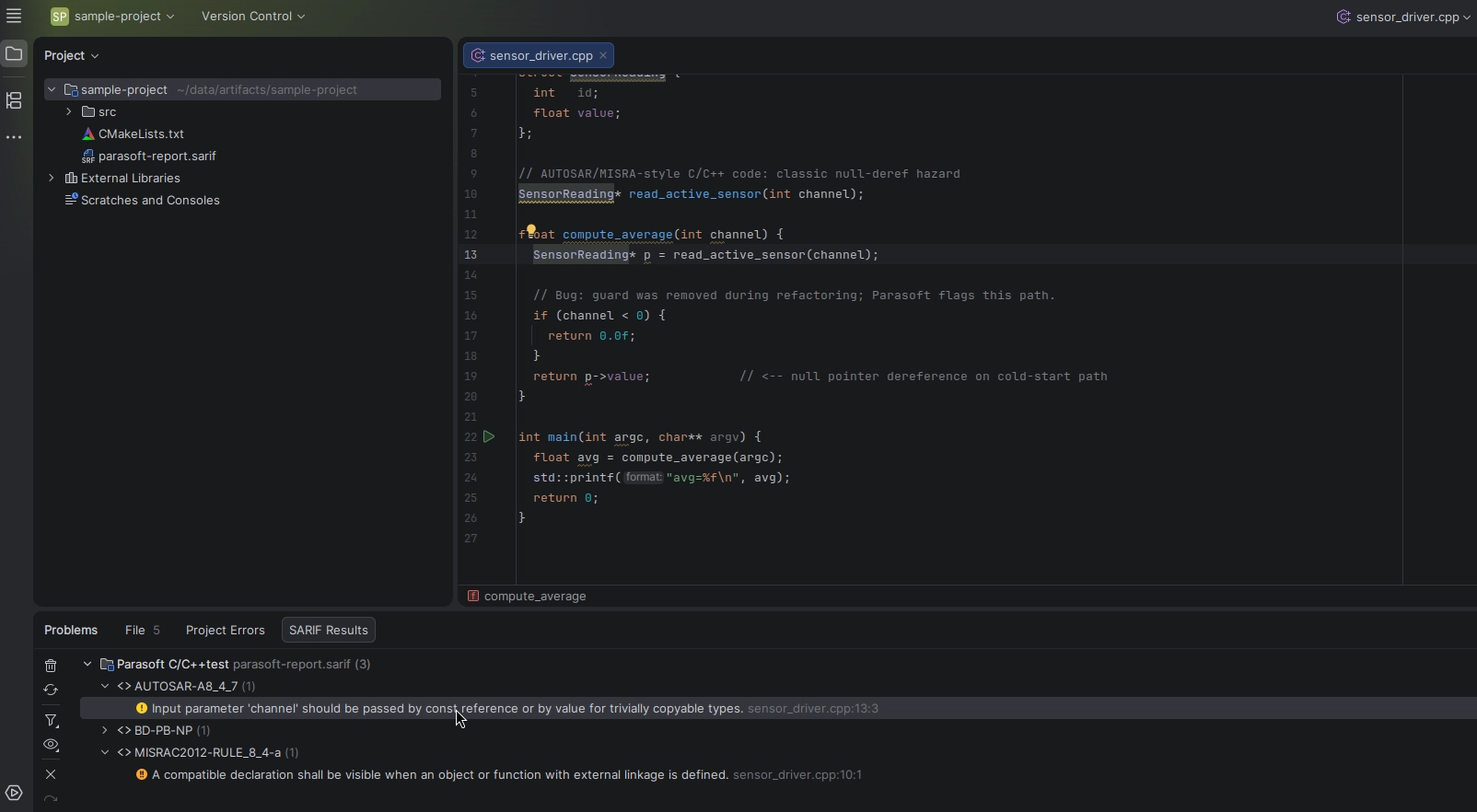
You can import .sarif or .sarif.json files directly into CLion.
The IDE:
- validates the report
- creates a dedicated SARIF Results tab
- groups findings by tool and rule
- lets you navigate directly to affected source code
Imported reports remain associated with the project and restore when reopening it. Results can also be filtered, regrouped or re-imported later.
Image 1 – Review SARIF findings directly in CLion and move from analysis to code without switching tools. (Source: JetBrains)
Why this matters for embedded and regulated environments
For embedded and automotive teams, static analysis is rarely optional. Standards and frameworks such as:
- MISRA
- AUTOSAR
- CERT C/C++
- ISO 26262
often depend on external analysis outputs.
The SARIF Viewer moves those results closer to the actual development workflow instead of leaving them inside CI artifacts or vendor dashboards. That means less context switching and faster triage.
The bigger picture
These updates are not headline features. They are something quieter – and arguably more important.
Accessibility improvements reduce friction between developers and the IDE.
SARIF Viewer reduces friction between analysis and action.
Different directions, same outcome: less switching, more context and fewer small interruptions during everyday work.
otherTech Blog
01
 02
02
 03
03
 04
04
 05
05

In the news
Java 27 is here – but staying current shouldn’t disrupt your development workflow
30.09.2026
Tech Blog
IntelliJ IDEA goes LSP – what happens when IDE intelligence stops being tied to the IDE?
31.08.2026
In the news
The next stage of AI development isn’t smarter models – it’s better coordination
23.07.2026
In the news
The real shift in AI coding agents is workflow, not model choice
30.06.2026
In the news
CLion 2026.2 is focused on the work around the code