

get in touch


AI coding tools are useful, but they often still sit outside the real development flow.
You ask a question in chat. You explain the problem. You copy in context. You get an answer. Then the real work starts again: applying the change, running tests, debugging failures and reviewing the result.
That gap matters.
The latest JetBrains AI updates point to a more practical direction. JetBrains AI now recommends an agent from the start, with Codex as the current default. At the same time, Junie, JetBrains’ own AI coding agent, has left Beta with a stronger focus on planning, debugging, code review, async work and IDE integration.
The important story is not simply that one agent became the default or that another reached general availability.
The important story is that AI coding agents are becoming useful only when they fit into the way software is actually built.
Why a recommended agent matters
Defaults shape behaviour.
When a developer opens an AI tool, the first decision should not be a long comparison of agents, models, reasoning levels, latency and cost. Those questions matter, but they are not the work. They are setup friction.
That is why JetBrains’ Codex recommendation is interesting. The choice was based on practical engineering criteria: solve rate, median cost and median end-to-end latency across real software development tasks in Java, C# and Python.
This is the right kind of evaluation.
Not: which model sounds most impressive?
But: can it complete the task, how long does it take and does the cost make sense for regular use?
That does not mean the recommended agent is the right choice for every team or every task. JetBrains is clear that developers can switch agents. The recommendation is a starting point, not a constraint.
For teams, that is probably the right mental model too. A default is useful because it reduces choice friction. It should not become a blind rule.
Benchmarks are useful, but they are only the start
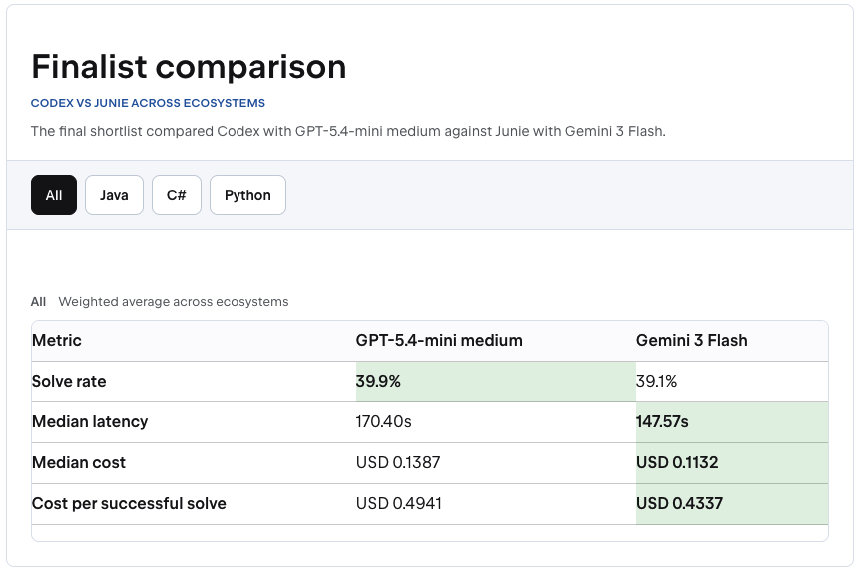
The final comparison between Codex and Junie was close.
Image 1 – Codex Junie comparison: The final comparison shows why agent choice is not only about solve rate – latency, cost and workflow fit matter too. (Source: JetBrains Blog)
In JetBrains’ weighted comparison across ecosystems, Codex with GPT-5.4-mini medium had a 39.9% solve rate. Junie with Gemini 3 Flash had 39.1%. Junie was faster and cheaper in the same comparison, while Codex came out ahead after JetBrains validated the offline benchmark with an online A/B test.
That is a useful result precisely because it is not magical.
A solve rate around 40% does not say, ‘agents can replace developers’. It says something more practical: agents can help with real development tasks, but only when the work is bounded, testable and reviewed.
This is where teams need to be careful.
An agent can be a good fit for a failing test, a contained refactor, a small feature with clear acceptance criteria or an investigation where the expected output is easy to verify. It is a weaker fit for vague requests, unclear requirements or changes where nobody agrees what success looks like.
Benchmarks help select a starting point. They do not replace engineering judgement.
What agent maturity looks like
Junie leaving Beta is useful because it shows what coding agent maturity is starting to mean.
It is not only about generating more code. It is about working closer to the development process.
The most important example is planning before coding. In Junie’s Plan mode, the agent creates a structured plan before implementation. The plan can include requirements, technical design, delivery stages and testing strategy. Developers can edit it, approve it and keep it in the project.
That matters because one of the most common AI failures is not bad syntax. It is confidently solving the wrong problem.
A reviewable plan changes the sequence. The team can correct the direction before code is generated, before tokens are spent and before someone has to review a diff that should never have existed.
Debugging is another important shift. Many AI tools can suggest likely causes of a bug. That can be useful, but it is still often a guess. Junie’s debugger integration is different because it can work with runtime state: debug sessions, breakpoints, stack frames, threads and expressions.
That matters because many bugs are not solved by reading code alone. They are solved by watching what the program actually does.
The same idea applies to code review. A useful review is not just a list of suspicious lines. It needs project context: tests, conventions, build behaviour and the reasoning behind the change. JetBrains positions Junie’s review flow around that context, rather than treating the pull request as an isolated diff.
Taken together, these features point to the larger trend. A useful coding agent is not a separate chat window. It is part of the toolchain.
Cost control becomes a workflow decision
There is another practical point here: teams should not treat every AI task the same way.
JetBrains considered cost and latency when selecting the recommended agent. Junie also supports different model providers, bring-your-own-key setups and local runtimes such as LiteLLM, LMStudio and Ollama.
That matters because wider AI adoption depends on cost control.
Some tasks justify stronger reasoning. Others need speed, lower cost or local execution. A complex migration plan is not the same as updating a small test. Investigating a subtle runtime bug is not the same as generating boilerplate.
Mature AI use will probably look less like ‘choose one model for everything’ and more like normal engineering trade-offs: use the right tool for the task, the risk and the feedback loop.
What teams should change
The practical next step is not to hand over large pieces of work and hope for the best.
Start where the feedback loop is strong. Use agents on tasks with tests, clear acceptance criteria or a small blast radius. Ask for a plan before implementation when the work is ambiguous. Keep human review mandatory. Measure whether the work actually moves faster without creating more review burden, rework or confusion.
And keep the agent choice flexible.
Codex may be the recommended starting point in JetBrains AI today. Junie may be a better fit for IDE-deep workflows, Java-heavy projects, bring-your-own-key setups or cost-sensitive teams. Another agent may fit a different workflow better.
That is the point. The question is not only which model gives the best answer.
The better question is:
Can this agent take on a real task, work inside our development process and leave us with something we can understand, test and review?
That is the standard worth using.
otherTech Blog
01
 02
02
 03
03
 04
04
 05
05

In the news
Java 27 is here – but staying current shouldn’t disrupt your development workflow
30.09.2026
Tech Blog
IntelliJ IDEA goes LSP – what happens when IDE intelligence stops being tied to the IDE?
31.08.2026
In the news
The next stage of AI development isn’t smarter models – it’s better coordination
23.07.2026
In the news
Small changes, less friction – recent JetBrains updates worth knowing about
26.05.2026
In the news
CLion 2026.2 is focused on the work around the code