

get in touch


For engineering teams, February brings two updates from JetBrains – a Java-to-Kotlin converter for Visual Studio Code and a set of “modern Go” guidelines for AI agents (Junie and Claude Code). Both aim to reduce two common sources of friction: migrations that get stuck in mechanical rewrites, and AI-generated code that drifts towards older patterns.
Java to Kotlin conversion comes to Visual Studio Code
JetBrains has released a Java-to-Kotlin (J2K) converter extension for Visual Studio Code. It lets you convert an individual .java file into Kotlin via a simple context menu action, which is useful for incremental migrations and mixed Java/Kotlin codebases.
JetBrains also states the extension uses the same underlying conversion engine used in their primary IDEs, aiming for output that follows Kotlin idioms and syntax requirements.
Where to get it
The extension is published on the Visual Studio Marketplace as JetBrains’ “j2k-vscode”.
How it works in practice
You open a Java file, right-click in the editor (or on the file in the Explorer) and select Convert to Kotlin. JetBrains positions it as a low-friction way to get a first-pass conversion without manually rewriting everything from scratch.
Write modern Go code with Junie and Claude Code
JetBrains has also released a plugin called go-modern-guidelines, designed to steer AI agents towards modern, idiomatic Go that matches the Go version declared in go.mod. The goal is simple: reduce “outdated code by default” when agents generate solutions.
JetBrains highlights two reasons this happens:
- Data cutoff – models may not know language and stdlib features introduced after their training cutoff
- Frequency bias – training data tends to contain more older code than newer patterns, so suggestions lean “traditional”
What the guidelines change is the agent’s default behaviour. The plugin detects your Go version from go.mod and instructs the agent to use features and stdlib additions available up to that version, including examples JetBrains calls out (such as preferring newer standard approaches where they apply).
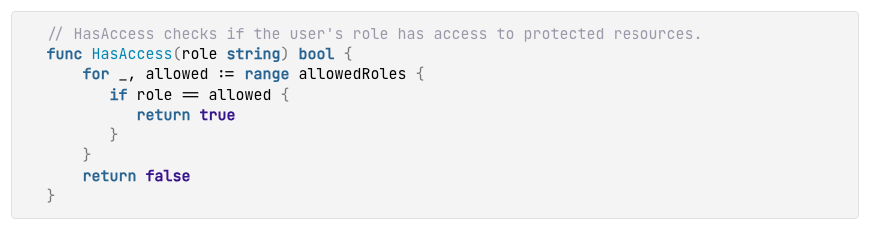
Image 1 (before) – Example of older-style output AI agents often produce – a manual loop. (Source – JetBrains)

Image 2 (after) – With modern Go guidelines applied – using slices.Contains for the same check. (Source – JetBrains)
For Junie, JetBrains says the guidelines are applied automatically starting with Junie version 2xx.620.xx or higher. For older versions, update the plugin. There is also a setting to disable the behaviour under Junie project settings for Go.
For Claude Code, JetBrains provides commands to add the repository as a marketplace, install the plugin and activate it per session using /use-modern-go, after which Claude Code detects the Go version from go.mod.
Rollout notes
If you are considering either update, a small pilot goes a long way:
- For J2K in VS Code, validate how the converted Kotlin fits your team’s conventions and review expectations, especially around nullability, interop and formatting.
- For Go guidelines, align on what “modern” means in your environment (it should be “compatible with our Go version”), then keep the agent’s output reviewable and incremental, like any other change.
How Neos can help
We handle JetBrains licensing and renewals – so if you need to align IDE seats or JetBrains AI subscriptions across teams, we can help with the commercial side.
otherTech Blog
01
 02
02
 03
03
 04
05
04
05

In the news
January updates – Codex arrives in JetBrains IDEs, plus the CLion 2026.1 roadmap
29.01.2026
In the news
JetBrains December updates – Unified IntelliJ IDEA, CLion 2025.3, Scala Plugin 2025.3, and Junie in AI Chat
16.12.2025
In the news
Gemini 3 Pro in JetBrains IDEs – what changed, why it matters, how to roll it out
27.11.2025
In the news
Product updates – IntelliJ IDEA 2025.2.4 and MPS maintenance releases
31.10.2025
In the news
IntelliJ IDEA, Rider and ReSharper 2025.2.2 – practical fixes, smoother upgrades and AI that gets out of your way