

get in touch

What and why?
The second version of our product Message gateway receives messages from customers and sends them to end users via various SMS service providers. For receiving messages from the customer, we support SMPP and HTTP protocols.
In this article, we are going to describe how we process message parts received from and assemble whole messages.
One issue with SMS is that messages are limited to 160 characters. The way SMS protocol overrides that limitation is by using so-called “Long SMS messages”. Basically, multiple SMS messages are sent as parts of the final message, which is displayed to the end user only after all parts arrive.
SMPP protocol supports this feature, so we need to support it in our product as well. Since we are not limited to SMPP protocol only, we made our own abstraction of multi-part messages. It boils down to this: every message is multi-part and can have one or more parts. Messages with one part are logically not multi-part, but from a technical perspective, it’s easier to treat all messages in the same way, so we don’t make the structural differences between single-part messages and multi-part messages.
Our product must be cluster ready, with multiple active nodes running and our customers can be connected to any of the active nodes (customers are not really aware of nodes, they always connect to the same virtual IP address and the load-balancer behind it distributes connections to the available nodes in a round-robin fashion). We also support customer multi-binding, meaning that same customer can be have more than one active connection simultaneously. It can even send different parts of same multi-part message through different connections.
This means we have to be able to aggregate message parts coming from customers through one or more connections which can be established to any of our application nodes.
In the previous version of our product, we used Hazelcast’s distributed maps to achieve this. As parts are coming in, they are stored to the Hazelcast map and after last part is collected, the final message is assembled. This is quite simple, but there are some limitation:
– application nodes must be visible to each other over the network
– if Hazelcast map is not persisted, we can lose data in case some application nodes go down.
We could enable map data persistence but that requires “centralized system that is accessible from all Hazelcast members. Persistence to a local file system is not supported.” as stated in Hazelcast documentation. Persisting to centralized data store (E.g. database) will slow things down.
Since we already use Apache Kafka, we decided to use it for aggregating message parts. Compared to Hazelcast implementation, this is more robust and fail-safe solution which doesn’t require direct data replication between application nodes.
And this is how it works…
We have two topics, first is called “customer-incoming-message-parts” and, as you can guess, it’s used for storing message parts. Second is called “customer-incoming-messages” and this is where the final messages (containing all parts) are stored.
When a message is received from the customer, it contains data that we can use to examine if this is single-part or multi-part message.
If it’s single part, a new instance of the final message (class “WholeMessage”) is created and written directly to the “customer-incoming-messages” topic (using KafkaProducer).
Otherwise (if message received from customer is multi-part), we can extract info such as an identifier of the message this part belongs to, number (index) of this part, total parts count that final message contains. Then we just create an instance of the message part (class “MessagePart”), fill it with the info mentioned before and write it to “customer-incoming-message-parts”, also using KafkaProducer.
The customer connection handler’s job is done here. It does’t needs to worry how the message parts will be assembled or processed, so the code is pretty simple and clean.
Assembling final messages
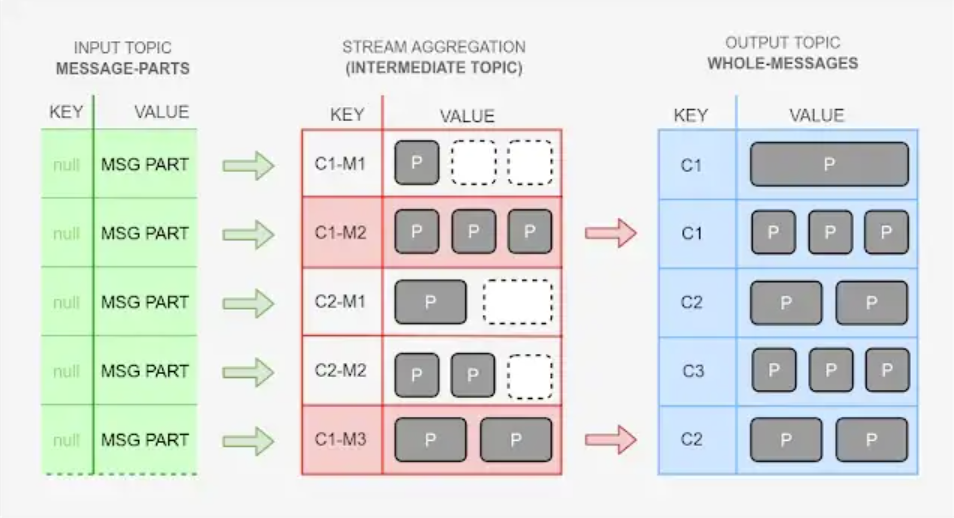
The actual assembling of messages is done by KafkaStreams API. This picture shows how our data is moved around.
CX represents customer id, MX represents message id, P represents message part
What we need to do is:
1. Configure streams application
2. Define steams application topology by using KStream / KTable operations
3. Start streams application
And this is how the code looks ( written in Kotlin ) :
val config = Properties()
config.put(StreamsConfig.APPLICATION_ID_CONFIG, "customer-incoming-message-parts-processor")
config.put(StreamsConfig.BOOTSTRAP_SERVERS_CONFIG, bootstrapServers)
config.put(StreamsConfig.DEFAULT_KEY_SERDE_CLASS_CONFIG, Serdes.LongSerde::class.java)
config.put(StreamsConfig.DEFAULT_VALUE_SERDE_CLASS_CONFIG, MessagePartSerde::class.java)
config.put(StreamsConfig.EXACTLY_ONCE, true)val streamConfig = StreamsConfig(config)val builder = StreamsBuilder()val inputStream = builder.stream<Long, MessagePart>("customer-incoming-message-parts")
inputStream
        .groupBy({ _, value ->
            "${value.senderId}-${value.senderMsgId}"
        }, Serialized.with(Serdes.String(), MessagePartSerde()))
        .aggregate(
                WholeMessageInitializer(),
                MessagePartAggregator(),
                Materialized.with(Serdes.StringSerde(), WholeMessageSerde())
        )
        .toStream()
        .filter { _, value -> value.parts.size == value.totalPartsCount }
        .map { _, value -> KeyValue(null as Long?, value) }
        .to(
                "customer-incoming-messages",
                Produced.with(Serdes.Long(), WholeMessageSerde())
        )streams = KafkaStreams(builder.build(), streamConfig)
streams.start()
Configuring streams application
Streams configuration requires “application id” property. Here “application” doesn’t mean your application or some external application, this refers to a set of processes that run this KafkaStreams topology across your application nodes. This property is very similar to group id with Kafka consumer configuration. It is used (among other things) to control how multiple instances of this KafkaStreams process access topic partitions. Same as with consumer groups, multiple instances of KafkaStreams with same application id can never read the same topic partition simultaneously. The number of partitions limits the number of streaming application instances that can read from the topic simultaneously.
Boostrap servers property is same thing we use when configuring any Kafka producer or consumer. We need to tell our streams application how to find Kafka cluster, by providing one or more broker addresses (comma separated) in form {host}:{port}
The default key “serde” and value “serde” property defines which Serdes (serializer and deserializer combined) to use for serializing and deserializing keys and values of topic records. There is a bunch of predefined serdes already provided by Kafka library, but you can also implement your own.
We only set default serdes, but sooner or later we will want to transform key or value of input topics to some other type on the output, thus requiring different serdes, and in our example, we are doing it by using “Serialized.with”, “Materialized.with” and “Produced.with” methods.
“Exactly once” property tells KafkaStreams that we want it to take care of every message from input topic is processed by this stream’s topology but not more than once. The default value of this property is false which means that messages will be processed in “at least once” mode. In this mode, all messages will be processed, but some messages can be processed twice in a case of an application node crash. Exactly once is the most desirable behaviour. It comes with some overhead (not too high though ) so you need to decide if this is what you need.
Defining topology of streams application
KafkaStreams DSL provides operations for transforming, filtering, aggregating ..etc of stream records.
We distinguish stateless from stateful operations. Stateless operations operates on records without depending on result of operations on previous records (filtering, mapping…) while stateful operations do (counting, aggregating…) .
Our input topic is “customer-incoming-message-parts” which is filled with message parts by multiple customer connection handlers. So this topic contains message parts from different customers which belong to different “final” messages. Message part object is value of this topic records, and key is null. Message part objects have all the information we need (customer id, message id, part number, total parts count). By using null for key, we achieve filling partitions in round-robin fashion thus balancing data more evenly among Kafka brokers and we also get more parallelism in processing that data. Number of partitions in this topic is currently set to 6, so we can process data with up to 6 streams applications simultaneously, although we will probably only have 3 nodes (instances of streaming app).
In “customer-incoming-message-parts-processor” application topology, first thing we define is input topic — from which our streams application is fed. “builder.stream()” method creates so called “source stream”. Records in that stream are same as in input topic, key = null, value = message part instance.
Now most important part — aggregating. To aggregate message part belonging to same message, first we group message parts by compound key combining customer id and message id. customer id is necessary because different customers can have same message ids. Message id type is String which gives us best flexibility since we don’t know which type customers use for message id’s. String can wrap anything.
Once we have message parts grouped by customer id and message id, we aggregate those parts.
aggregate() method requires instances of org.apache.kafka.streams.kstream.Initializer and org.apache.kafka.streams.kstream.Aggregator as arguments.
Initializer is used to initiate “empty” instance of “aggregation result object” while Aggregator is used to add parts to appropriate aggregation result object.
In our case Initializer only returns new instance of “final” message which is empty, no parts added yet.
inner class WholeMessageInitializer : Initializer<WholeMessage> {
override fun apply(): WholeMessage {
return WholeMessage(0, "", 0)
}
}
And here is our aggregator. Every time new part comes, the aggregator’s apply method will be called with that part as well as the current aggregation result passed as arguments. What the aggregator needs to do, is to return new aggregation result object based on those arguments. We just make another instance of “WholeMessage” add all parts present in the current aggregation and add a new part.
inner class MessagePartAggregator : Aggregator<String, MessagePart, WholeMessage> {
override fun apply(msgId: String, part: MessagePart, message: WholeMessage): WholeMessage? {
val updatedMessage = WholeMessage(part.senderId, part.senderMsgId, part.partsCount)
updatedMessage.parts.addAll(message.parts)
updatedMessage.parts.add(part)
return updatedMessage
}
}
This solves aggregation. The result of the aggregation operation is KTable with String as a key and WholeMessage as a value. Now we can convert it to stream, filter it in order to get only fully assembled WholeMessage records and output those instances to output topic.
.toStream()
.filter { _, value -> value.parts.size == value.totalPartsCount }
.map { _, value -> KeyValue(null as Long?, value)}
.to(
"customer-incoming-messages",
Produced.with(Serdes.Long(), WholeMessageSerde())
)
In the current phase of development, it seems that messages in the output topic don’t need to be processed in the exact order they arrived, more important is to get the maximum possible speed of processing, and that can be achieved by having messages evenly distributed across topic partitions by using null keys (results in round-robin writing to partitions). There is a possibility that we will have to process messages belonging to the same customer sequentially so we decided key type of output topic to be Long, and maybe later instead of null key we will use the customer id.
Since our output topic, key type is Long (for reasons described above), and the aggregation key is a string, before using to the () operation we need to transform record keys. To achieve this transformation, we use the map() operation and transform our key to null value of the Long type.
Now in the output topic we have only fully assembled “WholeMessage” instances that will be processed by the application of another stream.
otherTech Blog
01
 02
02
 03
03
 04
04
 05
05

In the news
March updates – proactive AI experiments in JetBrains IDEs, plus Junie CLI in Beta
26.03.2026
In the news
February updates – Java-to-Kotlin conversion in VS Code, plus modern Go output from AI agents
27.02.2026
In the news
January updates – Codex arrives in JetBrains IDEs, plus the CLion 2026.1 roadmap
29.01.2026
In the news
JetBrains December updates – Unified IntelliJ IDEA, CLion 2025.3, Scala Plugin 2025.3, and Junie in AI Chat
16.12.2025
In the news
Gemini 3 Pro in JetBrains IDEs – what changed, why it matters, how to roll it out