

get in touch


JetBrains closed the year with four meaningful updates that simplify product choice, speed up C and C++ work, tighten Scala workflows and take a first step towards a single AI surface inside the IDEs. Below is a concise summary – what changed, why it matters for teams, and how to roll it out without drama. All claims come from JetBrains’ official posts; we have not run independent tests.
IntelliJ IDEA becomes one product
From 2025.3 there is a single IntelliJ IDEA. Everything that was free in Community stays free, and JetBrains adds more free capability such as basic Spring and SQL coverage. If you need extended tooling, the Ultimate subscription unlocks it in the same install with a 30-day trial available. Existing Ultimate licences transition to an Ultimate subscription model; if a subscription lapses you are not locked out, you simply continue on the free core feature set until you renew. For education and open-source users, nothing is taken away – the codebase remains on GitHub and educational access continues.
Why this matters: fewer choices at download time, simpler trials, and no more edition switching. Teams can standardise on one installer and manage subscription status centrally without asking developers to reinstall.
CLion 2025.3 raises the ceiling for C and C++
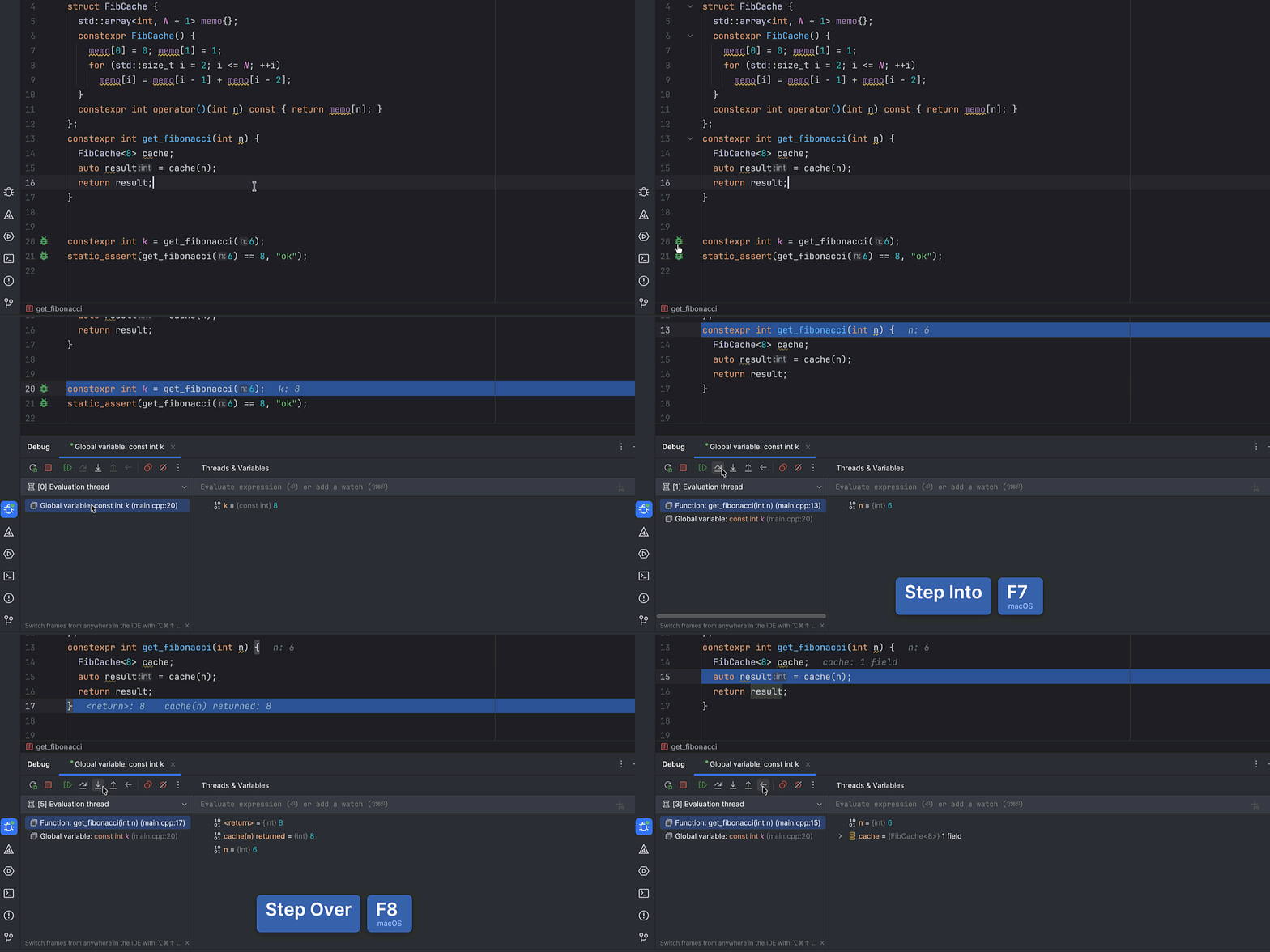
CLion’s Nova language engine becomes the default, replacing Classic. JetBrains reports faster completion, highlighting and refactors on large projects, along with lower memory use. Two additions stand out. The Constexpr Debugger lets you step through compile-time evaluation, inspect values and confirm which if constexpr branch fired – a niche but powerful window into how the compiler actually executes. CLion also adds DAP support, opening the door to more debugger choices beyond LLDB and GDB. A new Islands theme refreshes the look without changing behaviour, and embedded workflows get smoother with bundled plugins and STM32 focus. AI options broaden with model selection and a path towards BYOK in a minor 2025.3 update.
Image 1: Constexpr Debugger screenshot (source – JetBrains)
Scala Plugin 2025.3 focuses on 3.8 support and scale
Scala 3.8 lands with language changes such as the into modifier and JDK 17 as the baseline. The plugin also brings Structural Search and Replace, enabling pattern-based search and change across codebases – valuable when you enforce consistent styles or migrate idioms. Build tooling sees early sbt 2.0 alignment and sturdier Mill handling, while performance work targets UI thread hiccups and offers a practical switch: if you enable compiler-based highlighting, you can disable built-in inspections to reduce overhead on very large projects.

Image 2: Scala performance settings screenshot (Disable built-in inspections) (Source: JetBrains)
Junie moves into the AI chat
JetBrains has started unifying its AI surfaces. Junie, the coding agent, is now selectable inside the AI chat in Beta. The plan is to merge the standalone Junie UI into this single chat over time. During the transition there are separate settings paths – changes in the chat do not yet affect the plugin, while Junie plugin settings apply to both. The benefit for teams is clarity: one place to talk to models and agents, with a cleaner way to govern how developers use AI inside the IDE.
Rollout notes you can copy
For IntelliJ IDEA, treat the unified distribution as your new standard image. Keep the trial flow simple – developers who need Ultimate start a trial, others continue on the free core set with no reinstall required. For CLion, plan the switch to Nova and communicate that some features are intentionally Nova-only. Ask C++ leads to validate debugger choices if you plan to use DAP. For Scala, publish a short internal tip: how to use SSR for safe code-wide changes, when to rely on compiler-based highlighting and how to toggle inspections for performance.
Across AI features, keep the usual governance: treat AI output as authored code, require small pull requests, and keep prompts and diffs visible for review. When Junie lives fully inside the chat, this will get easier to manage because there is one surface to supervise.
How Neos can help
We handle JetBrains licensing and renewals – aligning subscriptions, consolidating seats, and timing upgrades or trials so adoption is tidy and predictable. If you need to regularise mixed Community/Ultimate usage or prepare for the unified IntelliJ IDEA rollout, we can sort the paperwork and timing.
otherTech Blog
01
 02
02
 03
03
 04
05
04
05

In the news
February updates – Java-to-Kotlin conversion in VS Code, plus modern Go output from AI agents
27.02.2026
In the news
January updates – Codex arrives in JetBrains IDEs, plus the CLion 2026.1 roadmap
29.01.2026
In the news
Gemini 3 Pro in JetBrains IDEs – what changed, why it matters, how to roll it out
27.11.2025
In the news
Product updates – IntelliJ IDEA 2025.2.4 and MPS maintenance releases
31.10.2025
In the news
IntelliJ IDEA, Rider and ReSharper 2025.2.2 – practical fixes, smoother upgrades and AI that gets out of your way